Data explorer - Files
Files in the Data Explorer
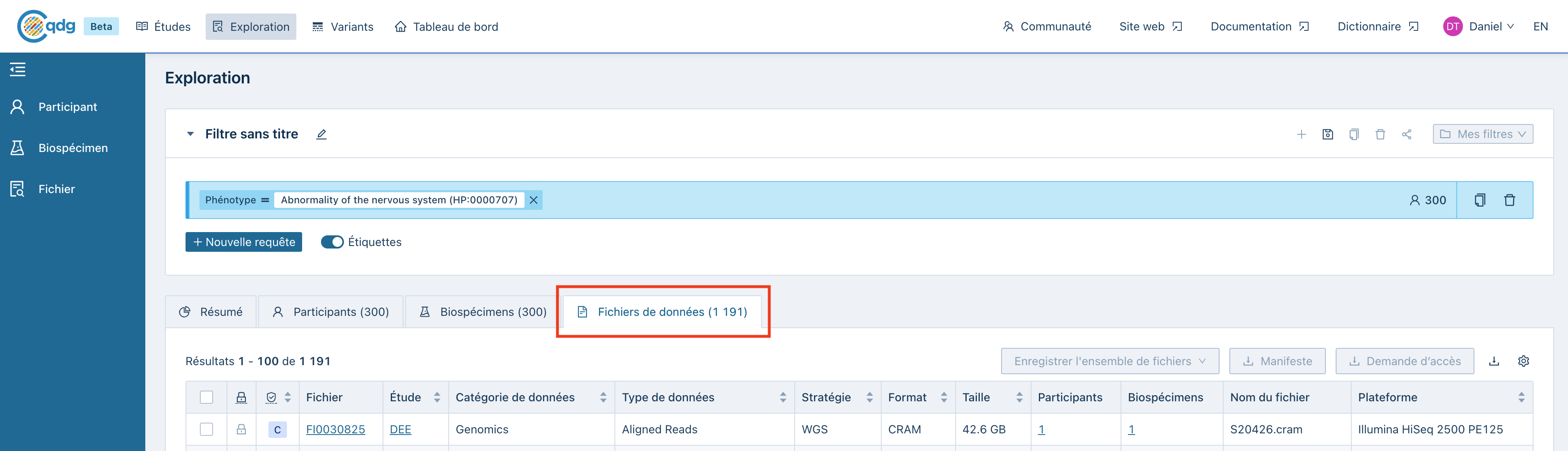
The "Files" tab displays detailed information about the files selected using the filters applied in the data explorer.
The "Data Files" tab is located to the right of the "Biospecimens" tab, below the queries and filters section.
Show more or fewer columns
Columns display additional information about the files from the user's query. Some columns are displayed by default. More or fewer columns can be displayed using the gear icon located at the top right of the tab. The content of the columns is described in the table below.
| Column title | Column description |
|---|---|
| File authorization (lock icon) | Indicates whether the user has permission to download this file. A closed lock indicates that access is not authorized, while an open lock indicates that access is authorized. See also: Requesting access. |
| Data access (shield icon) | Indicates the level of access required to download the file. C represents controlled data for which an access request is required. R represents data for which the user simply needs to be a registered user of the portal. |
| File ID | The unique identifier assigned to each file in the CQDG portal. |
| Datasets | The dataset the file belongs to, if any. |
| Study | The code of the study from which this data file originates. See the study exploration tool for more information about the studies. |
| Data category | For now, this is only genomic data. |
| Data type | Aligned Reads Germline CNV Germline Structural Variant SNV Supplement: metadata from bioinformatics pipelines |
| Strategy | The strategy used to generate the file. WGS (whole genome sequencing) or WXS (whole exome sequencing). |
| Format | CRAM: format used for Aligned Reads VCF: format used for Germline CNV and Germline Structural Variant gVCF: format used for SNV TGZ: format used for supplementary data (Supplement) |
| Size | The size of the file. |
| Participants | The number of participants matching this file. Click the link to navigate to the "Participants" tab with these individuals selected. |
| Biospecimens | The number of biospecimens from which this data file was generated. Click the link to navigate to the "Biospecimens" tab with these biospecimens selected. |
| File name | The full name of the file. |
| Platform | The platform used to generate the data. |
Individual files
By clicking on the file ID link, you will be redirected to a page summarizing the information available for that file. In addition to the information already presented in the data explorer, this page includes detailed sections such as "Experimental Procedure" and "Analysis".